


Marcio
Licença Plus
-
Ingressou
-
Última visita
Tudo o que foi publicado por Marcio
-
Estava alimenta esse Wiki ai que me ajudou muito pra conseguir mudar as cores, depois tenta fazer um exclusivo pra janela de eventos e ranking se possivel...
-
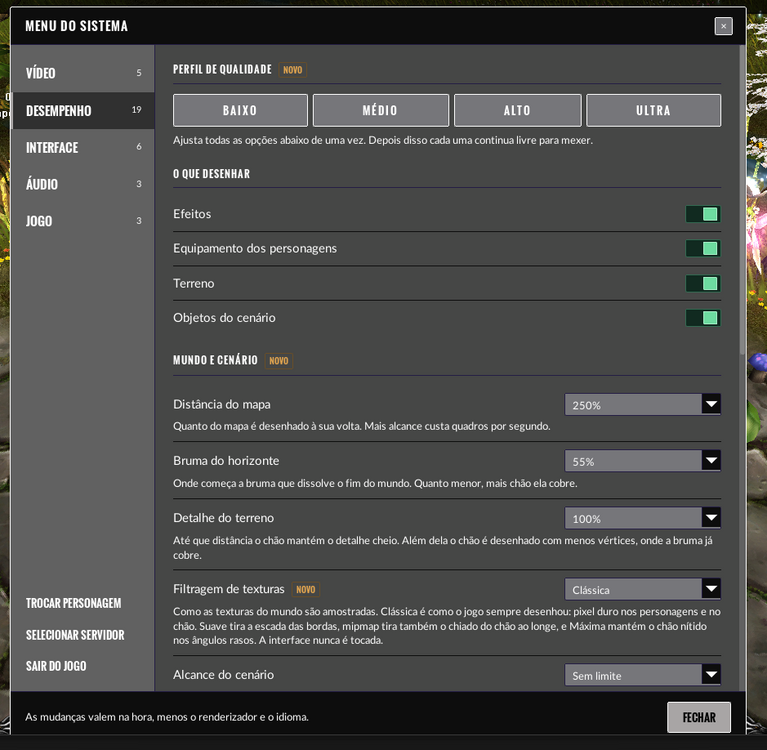
Fala pessoal fiz umas alterações aqui no visual das opções vou deixas as config pra vocês abaixo: ; Genesys x6 Plus - interface configuration. ; ; Panel controls which rows the System Menu shows. 1 shows it, 0 hides it. ; Hiding every row of a group hides the group heading too, and hiding ; every group of a tab hides the tab. ; ; Theme colours used by the interface, as RGB or RGBA hex without "#". ; ; Wording lives in the Text folder, one UTF-8 file per language. ; ; Changes take effect when the client is restarted. ; Login background: 1 = UI video/image (default), 0 = original client background. ; Background and panels can be chosen independently. [Login] background=0 ; 1 = UI server/account panels; 0 = original client controls. panels=0 [Panel] resolution=1 framelimit=1 borderless=1 vsync=1 renderer=1 effects=1 equipment=1 terrain=1 objects=1 itemglow=1 effectrange=1 weapontrail=1 terrainlight=1 texturefilter=1 shadowrange=1 profile=1 vegetation=1 terraindetail=1 particles=1 effectlimit=1 characterrange=1 objectrange=1 viewdistance=1 horizonfade=1 fontsize=1 language=1 damagenumbers=1 commandtips=1 slidehelp=1 fpscounter=1 volume=1 music=1 whispersound=1 autoattack=1 confirmdrop=1 confirmjewel=1 selectcharacter=1 selectserver=1 exitgame=1 [Theme] window=464746 titlebar=0d0d0d tabstrip=616161 footer=0d0d0d control=76767a tabselected=303030 tabhover=5e5d5d metertrack=6e4241 switchtrack=0a0718 overlay=0a0718 divider=241d45 border=ffffff scrollbar=858585 scrollbarhover=545353 text=ffffff textdim=ffffff textfaint=ffffff title=ffffff accent=a8a5a5 accentborder=ffffff accenthover=f20716 accenttext=020303 on=6ddba0 onborder=a8ecc6 ontrack=112a20 ontrackborder=336b52 switchknob=f20a19 switchknobborder=f53642 tag=e0a44f tagborder=6b4f27 Copiar e colar no UI.ini no gerador de main.
-
Coloca um sistema de tooltip para que mostre o drop do item

